Traces
Tracing is a fundamental component of the Strands SDK's observability framework, providing detailed insights into your agent's execution. Using the OpenTelemetry standard, Strands traces capture the complete journey of a request through your agent, including LLM interactions, retrievers, tool usage, and event loop processing.
Understanding Traces in Strands
Traces in Strands provide a hierarchical view of your agent's execution, allowing you to:
- Track the entire agent lifecycle: From initial prompt to final response
- Monitor individual LLM calls: Examine prompts, completions, and token usage
- Analyze tool execution: Understand which tools were called, with what parameters, and their results
- Measure performance: Identify bottlenecks and optimization opportunities
- Debug complex workflows: Follow the exact path of execution through multiple cycles
Each trace consists of multiple spans that represent different operations in your agent's execution flow:
+-------------------------------------------------------------------------------------+
| Strands Agent                                                                       |
| - gen_ai.system: <system name>                                                      |
| - gen_ai.agent.name: <agent name>                                                   |
| - gen_ai.operation.name: <operation>                                                |
| - gen_ai.request.model: <model identifier>                                          |
| - gen_ai.event.start_time: <timestamp>                                              |
| - gen_ai.event.end_time: <timestamp>                                                |
| - gen_ai.user.message: <user query>                                                 |
| - gen_ai.choice: <agent response>                                                   |
| - gen_ai.usage.prompt_tokens: <number>                                              |
| - gen_ai.usage.input_tokens: <number>                                               |
| - gen_ai.usage.completion_tokens: <number>                                          |
| - gen_ai.usage.output_tokens: <number>                                              |
| - gen_ai.usage.total_tokens: <number>                                               |
| - gen_ai.usage.cache_read_input_tokens: <number>                                    |
| - gen_ai.usage.cache_write_input_tokens: <number>                                   |
|                                                                                     |
|  +-------------------------------------------------------------------------------+  |
|  | Cycle <cycle-id>                                                              |  |
|  | - gen_ai.user.message: <formatted prompt>                                     |  |
|  | - gen_ai.assistant.message: <formatted prompt>                                |  |
|  | - event_loop.cycle_id: <cycle identifier>                                     |  |
|  | - gen_ai.event.end_time: <timestamp>                                          |  |
|  | - gen_ai.choice                                                               |  |
|  |   - tool.result: <tool result data>                                           |  |
|  |   - message: <formatted completion>                                           |  |
|  |                                                                               |  |
|  |  +-----------------------------------------------------------------------+    |  |
|  |  | Model invoke                                                          |    |  |
|  |  | - gen_ai.system: <system name>                                        |    |  |
|  |  | - gen_ai.operation.name: <operation>                                  |    |  |
|  |  | - gen_ai.user.message: <formatted prompt>                             |    |  |
|  |  | - gen_ai.assistant.message: <formatted prompt>                        |    |  |
|  |  | - gen_ai.request.model: <model identifier>                            |    |  |
|  |  | - gen_ai.event.start_time: <timestamp>                                |    |  |
|  |  | - gen_ai.event.end_time: <timestamp>                                  |    |  |
|  |  | - gen_ai.choice: <model response with tool use>                       |    |  |
|  |  | - gen_ai.usage.prompt_tokens: <number>                                |    |  |
|  |  | - gen_ai.usage.input_tokens: <number>                                 |    |  |
|  |  | - gen_ai.usage.completion_tokens: <number>                            |    |  |
|  |  | - gen_ai.usage.output_tokens: <number>                                |    |  |
|  |  | - gen_ai.usage.total_tokens: <number>                                 |    |  |
|  |  | - gen_ai.usage.cache_read_input_tokens: <number>                      |    |  |
|  |  | - gen_ai.usage.cache_write_input_tokens: <number>                     |    |  |
|  |  +-----------------------------------------------------------------------+    |  |
|  |                                                                               |  |
|  |  +-----------------------------------------------------------------------+    |  |
|  |  | Tool: <tool name>                                                     |    |  |
|  |  | - gen_ai.event.start_time: <timestamp>                                |    |  |
|  |  | - gen_ai.operation.name: <operation>                                  |    |  |
|  |  | - gen_ai.tool.name: <tool name>                                       |    |  |
|  |  | - gen_ai.tool.call.id: <tool use identifier>                          |    |  |
|  |  | - gen_ai.event.end_time: <timestamp>                                  |    |  |
|  |  | - gen_ai.choice: <tool execution result>                              |    |  |
|  |  | - tool.status: <execution status>                                     |    |  |
|  |  +-----------------------------------------------------------------------+    |  |
|  +-------------------------------------------------------------------------------+  |
+-------------------------------------------------------------------------------------+
OpenTelemetry Integration
Strands natively integrates with OpenTelemetry, an industry standard for distributed tracing. This integration provides:
- Compatibility with existing observability tools: Send traces to platforms like Jaeger, Grafana Tempo, AWS X-Ray, Datadog, and more
- Standardized attribute naming: Using the OpenTelemetry semantic conventions
- Flexible export options: Console output for development, OTLP endpoint for production
- Auto-instrumentation: Trace creation is handled automatically when you enable tracing
Enabling Tracing
To enable OTEL exporting, install Strands Agents with otel extra dependencies: pip install 'strands-agents[otel]'
To enable OTEL exporting, install the OpenTelemetry peer dependencies: npm install @opentelemetry/api @opentelemetry/sdk-trace-node @opentelemetry/sdk-trace-base @opentelemetry/resources @opentelemetry/exporter-trace-otlp-http
Environment Variables
# Specify custom OTLP endpoint
export OTEL_EXPORTER_OTLP_ENDPOINT="http://collector.example.com:4318"

# Set Default OTLP Headers
export OTEL_EXPORTER_OTLP_HEADERS="key1=value1,key2=value2"
Code Configuration
from strands import Agent

# Option 1: Skip StrandsTelemetry if global tracer provider and/or meter provider are already configured
# (your existing OpenTelemetry setup will be used automatically)
agent = Agent(
    model="us.anthropic.claude-sonnet-4-20250514-v1:0",
    system_prompt="You are a helpful AI assistant"
)

# Option 2: Use StrandsTelemetry to handle complete OpenTelemetry setup
# (Creates new tracer provider and sets it as global)
from strands.telemetry import StrandsTelemetry

strands_telemetry = StrandsTelemetry()
strands_telemetry.setup_otlp_exporter()     # Send traces to OTLP endpoint
strands_telemetry.setup_console_exporter()  # Print traces to console
strands_telemetry.setup_meter(
    enable_console_exporter=True,
    enable_otlp_exporter=True)       # Setup new meter provider and sets it as global

# Option 3: Use StrandsTelemetry with your own tracer provider
# (Keeps your tracer provider, adds Strands exporters without setting global)
from strands.telemetry import StrandsTelemetry

strands_telemetry = StrandsTelemetry(tracer_provider=user_tracer_provider)
strands_telemetry.setup_meter(enable_otlp_exporter=True)
strands_telemetry.setup_otlp_exporter().setup_console_exporter()  # Chaining supported

# Create agent (tracing will be enabled automatically)
agent = Agent(
    model="us.anthropic.claude-sonnet-4-20250514-v1:0",
    system_prompt="You are a helpful AI assistant"
)

# Use agent normally
response = agent("What can you help me with?")
import { Agent } from '@strands-agents/sdk'

// Option 1: Skip setupTracer() if a global tracer provider is already configured
// (your existing OpenTelemetry setup will be used automatically)
const agent = new Agent({
  systemPrompt: 'You are a helpful AI assistant',
})

import { telemetry, Agent } from '@strands-agents/sdk'

// Option 2: Use telemetry.setupTracer() to handle complete OpenTelemetry setup
// (creates a new tracer provider and registers it as global)
telemetry.setupTracer({
  exporters: { otlp: true, console: true }, // Send traces to OTLP endpoint and console debug
})

import { telemetry, Agent } from '@strands-agents/sdk'
import { NodeTracerProvider } from '@opentelemetry/sdk-trace-node'

// Option 3: Use setupTracer() with your own tracer provider
const provider = new NodeTracerProvider()
telemetry.setupTracer({
  provider,
  exporters: { otlp: true, console: true },
})

// Create agent (tracing will be enabled automatically)
const agent = new Agent({
  systemPrompt: 'You are a helpful AI assistant',
})

// Use agent normally
const result = await agent.invoke('What can you help me with?')
Trace Structure
Strands creates a hierarchical trace structure that mirrors the execution of your agent: - Agent Span: The top-level span representing the entire agent invocation - Contains overall metrics like total token usage and cycle count - Captures the user prompt and final response
-
Cycle Spans: Child spans for each event loop cycle
- Tracks the progression of thought and reasoning
- Shows the transformation from prompt to response
-
LLM Spans: Model invocation spans
- Contains prompt, completion, and token usage
- Includes model-specific parameters
-
Tool Spans: Tool execution spans
- Captures tool name, parameters, and results
- Measures tool execution time
Captured Attributes
Strands traces include rich attributes that provide context for each operation:
Agent-Level Attributes
| Attribute | Description |
|---|---|
gen_ai.system |
The agent system identifier ("strands-agents") |
gen_ai.agent.name |
Name of the agent |
gen_ai.user.message |
The user's initial prompt |
gen_ai.choice |
The agent's final response |
system_prompt |
System instructions for the agent |
gen_ai.request.model |
Model ID used by the agent |
gen_ai.event.start_time |
When agent processing began |
gen_ai.event.end_time |
When agent processing completed |
gen_ai.usage.prompt_tokens |
Total tokens used for prompts |
gen_ai.usage.input_tokens |
Total tokens used for prompts (duplicate) |
gen_ai.usage.completion_tokens |
Total tokens used for completions |
gen_ai.usage.output_tokens |
Total tokens used for completions (duplicate) |
gen_ai.usage.total_tokens |
Total token usage |
gen_ai.usage.cache_read_input_tokens |
Number of input tokens read from cache (Note: Not all model providers support cache tokens. This defaults to 0 in that case) |
gen_ai.usage.cache_write_input_tokens |
Number of input tokens written to cache (Note: Not all model providers support cache tokens. This defaults to 0 in that case) |
Cycle-Level Attributes
| Attribute | Description |
|---|---|
event_loop.cycle_id |
Unique identifier for the reasoning cycle |
gen_ai.user.message |
The user's initial prompt |
gen_ai.assistant.message |
Formatted prompt for this reasoning cycle |
gen_ai.event.end_time |
When the cycle completed |
gen_ai.choice.message |
Model's response for this cycle |
gen_ai.choice.tool.result |
Results from tool calls (if any) |
Model Invoke Attributes
| Attribute | Description |
|---|---|
gen_ai.system |
The agent system identifier |
gen_ai.operation.name |
Gen-AI operation name |
gen_ai.agent.name |
Name of the agent |
gen_ai.user.message |
Formatted prompt sent to the model |
gen_ai.assistant.message |
Formatted assistant prompt sent to the model |
gen_ai.request.model |
Model ID (e.g., "us.anthropic.claude-sonnet-4-20250514-v1:0") |
gen_ai.event.start_time |
When model invocation began |
gen_ai.event.end_time |
When model invocation completed |
gen_ai.choice |
Response from the model (may include tool calls) |
gen_ai.usage.prompt_tokens |
Total tokens used for prompts |
gen_ai.usage.input_tokens |
Total tokens used for prompts (duplicate) |
gen_ai.usage.completion_tokens |
Total tokens used for completions |
gen_ai.usage.output_tokens |
Total tokens used for completions (duplicate) |
gen_ai.usage.total_tokens |
Total token usage |
gen_ai.usage.cache_read_input_tokens |
Number of input tokens read from cache (Note: Not all model providers support cache tokens. This defaults to 0 in that case) |
gen_ai.usage.cache_write_input_tokens |
Number of input tokens written to cache (Note: Not all model providers support cache tokens. This defaults to 0 in that case) |
Tool-Level Attributes
| Attribute | Description |
|---|---|
tool.status |
Execution status (success/error) |
gen_ai.tool.name |
Name of the tool called |
gen_ai.tool.call.id |
Unique identifier for the tool call |
gen_ai.operation.name |
Gen-AI operation name |
gen_ai.event.start_time |
When tool execution began |
gen_ai.event.end_time |
When tool execution completed |
gen_ai.choice |
Formatted tool result |
Visualization and Analysis
Traces can be visualized and analyzed using any OpenTelemetry-compatible tool:
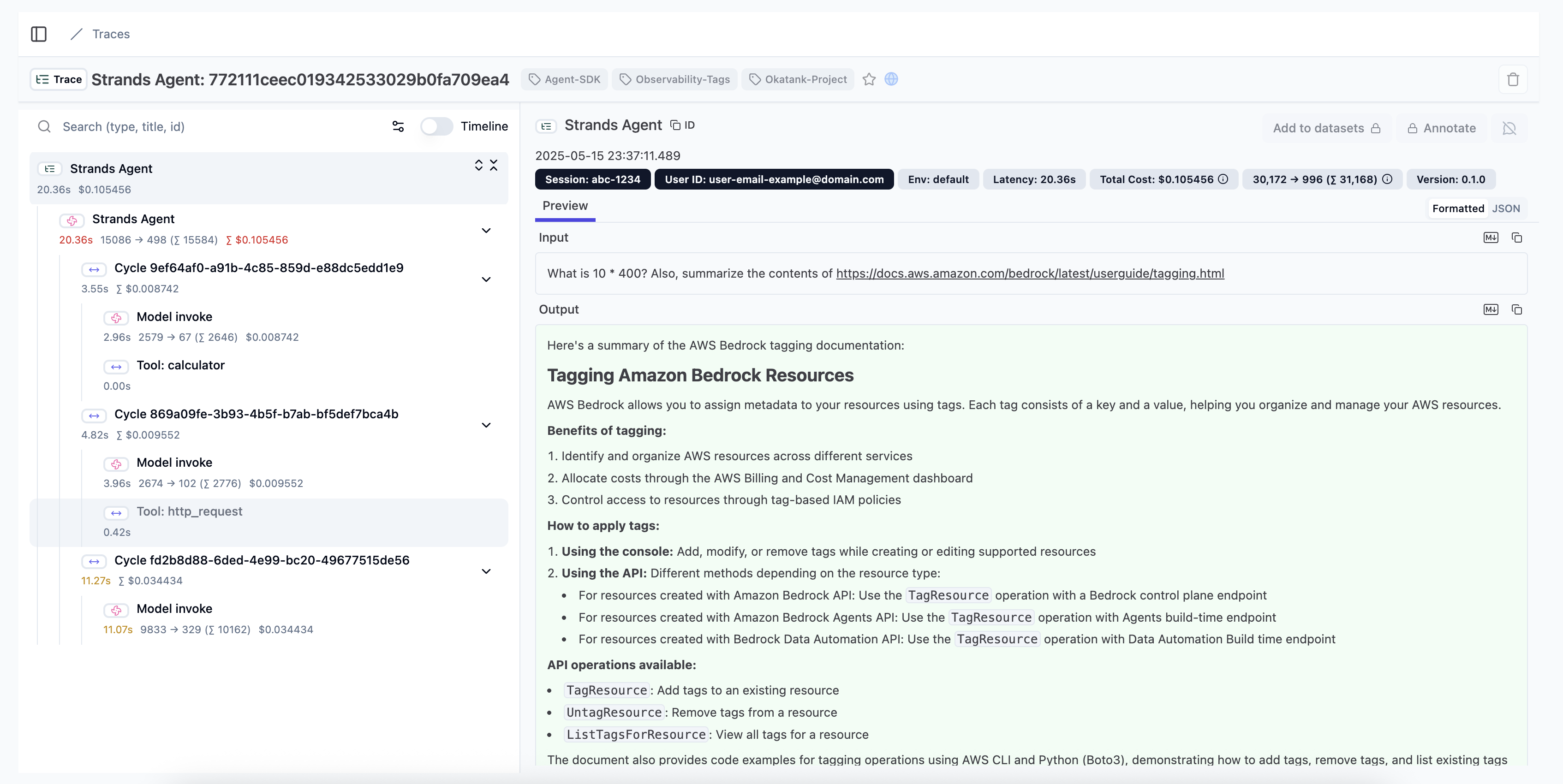
Common visualization options include:
- Jaeger: Open-source, end-to-end distributed tracing
- Langfuse: For Traces, evals, prompt management, and metrics
- AWS X-Ray: For AWS-based applications
- Zipkin: Lightweight distributed tracing
- Opik: For evaluating and optimizing multi-agent systems
Local Development Setup
For development environments, you can quickly set up a local collector and visualization:
# Pull and run Jaeger all-in-one container
docker run -d --name jaeger \
  -e COLLECTOR_ZIPKIN_HOST_PORT=:9411 \
  -e COLLECTOR_OTLP_ENABLED=true \
  -p 6831:6831/udp \
  -p 6832:6832/udp \
  -p 5778:5778 \
  -p 16686:16686 \
  -p 4317:4317 \
  -p 4318:4318 \
  -p 14250:14250 \
  -p 14268:14268 \
  -p 14269:14269 \
  -p 9411:9411 \
  jaegertracing/all-in-one:latest
Then access the Jaeger UI at http://localhost:16686 to view your traces.
You can also setup console export to inspect the spans:
from strands.telemetry import StrandsTelemetry

StrandsTelemetry().setup_console_exporter()
import { telemetry } from '@strands-agents/sdk'

telemetry.setupTracer({
  exporters: { console: true },
})
Advanced Configuration
Sampling Control
For high-volume applications, you may want to implement sampling to reduce the volume of data to do this you can utilize the default Open Telemetry Environment variables:
# Example: Sample 50% of traces
export OTEL_TRACES_SAMPLER="traceidratio"
export OTEL_TRACES_SAMPLER_ARG="0.5"
Custom Attribute Tracking
You can add custom attributes to any span:
agent = Agent(
    system_prompt="You are a helpful assistant that provides concise responses.",
    tools=[http_request, calculator],
    trace_attributes={
        "session.id": "abc-1234",
        "user.id": "user-email-example@domain.com",
        "tags": [
            "Agent-SDK",
            "Okatank-Project",
            "Observability-Tags",
        ]
    },
)
import { Agent } from '@strands-agents/sdk'

const agent = new Agent({
  systemPrompt: 'You are a helpful assistant that provides concise responses.',
  traceAttributes: {
    'session.id': 'abc-1234',
    'user.id': 'user-email-example@domain.com',
    tags: ['Agent-SDK', 'Okatank-Project', 'Observability-Tags'],
  },
})
Configuring the exporters from source code
The StrandsTelemetry().setup_console_exporter() and StrandsTelemetry().setup_otlp_exporter() methods accept keyword arguments that are passed to OpenTelemetry's ConsoleSpanExporter and OTLPSpanExporter initializers, respectively. This allows you to save the log lines to a file or set up the OTLP endpoints from Python code:
from os import linesep
from strands.telemetry import StrandsTelemetry

strands_telemetry = StrandsTelemetry()

# Save telemetry to a local file and configure the serialization format
logfile = open("my_log.jsonl", "wt")
strands_telemetry.setup_console_exporter(
    out=logfile,
    formatter=lambda span: span.to_json() + linesep,
)
# ... your agent-running code goes here ...
logfile.close()

# Configure OTLP endpoints programmatically
strands_telemetry.setup_otlp_exporter(
    endpoint="http://collector.example.com:4318",
    headers={"key1": "value1", "key2": "value2"},
)
For more information about the accepted arguments, refer to ConsoleSpanExporter and OTLPSpanExporter in the OpenTelemetry API documentation.
The telemetry.setupTracer() function reads OTLP configuration from standard OpenTelemetry environment variables (OTEL_EXPORTER_OTLP_ENDPOINT, OTEL_EXPORTER_OTLP_HEADERS). For full control over exporter configuration, provide your own NodeTracerProvider:
import { telemetry } from '@strands-agents/sdk'
import { NodeTracerProvider } from '@opentelemetry/sdk-trace-node'
import { BatchSpanProcessor, SimpleSpanProcessor, ConsoleSpanExporter } from '@opentelemetry/sdk-trace-base'
import { OTLPTraceExporter } from '@opentelemetry/exporter-trace-otlp-http'

const provider = new NodeTracerProvider()

// Configure OTLP endpoint programmatically
provider.addSpanProcessor(
  new BatchSpanProcessor(
    new OTLPTraceExporter({
      url: 'http://collector.example.com:4318/v1/traces',
      headers: { key1: 'value1', key2: 'value2' },
    })
  )
)

// Add console exporter for debugging
provider.addSpanProcessor(new SimpleSpanProcessor(new ConsoleSpanExporter()))

// Register the provider with Strands
telemetry.setupTracer({ provider })
For more information about the accepted arguments, refer to the OpenTelemetry JS documentation.
Best Practices
- Use appropriate detail level: Balance between capturing enough information and avoiding excessive data
- Add business context: Include business-relevant attributes like customer IDs or transaction values
- Implement sampling: For high-volume applications, use sampling to reduce data volume
- Secure sensitive data: Avoid capturing PII or sensitive information in traces
- Correlate with logs and metrics: Use trace IDs to link traces with corresponding logs
- Monitor storage costs: Be aware of the data volume generated by traces
Common Issues and Solutions
| Issue | Solution |
|---|---|
| Missing traces | Check that your collector endpoint is correct and accessible |
| Excessive data volume | Implement sampling or filter specific span types |
| Incomplete traces | Ensure all services in your workflow are properly instrumented |
| High latency | Consider using batching and asynchronous export |
| Missing context | Use context propagation to maintain trace context across services |
Example: End-to-End Tracing
This example demonstrates capturing a complete trace of an agent interaction:
from strands import Agent
from strands.telemetry import StrandsTelemetry
import os

os.environ["OTEL_EXPORTER_OTLP_ENDPOINT"] = "http://localhost:4318"
strands_telemetry = StrandsTelemetry()
strands_telemetry.setup_otlp_exporter()      # Send traces to OTLP endpoint
strands_telemetry.setup_console_exporter()   # Print traces to console

# Create agent
agent = Agent(
    model="us.anthropic.claude-sonnet-4-20250514-v1:0",
    system_prompt="You are a helpful AI assistant"
)

# Execute a series of interactions that will be traced
response = agent("Find me information about Mars. What is its atmosphere like?")
print(response)

# Ask a follow-up that uses tools
response = agent("Calculate how long it would take to travel from Earth to Mars at 100,000 km/h")
print(response)

# Each interaction creates a complete trace that can be visualized in your tracing tool
import { telemetry, Agent } from '@strands-agents/sdk'

// Set environment variables for OTLP endpoint
process.env.OTEL_EXPORTER_OTLP_ENDPOINT = 'http://localhost:4318'

// Configure telemetry
telemetry.setupTracer({
  exporters: { otlp: true, console: true },
})

// Create agent
const agent = new Agent({
  systemPrompt: 'You are a helpful AI assistant',
})

// Execute interactions that will be traced
const response = await agent.invoke('Find me information about Mars. What is its atmosphere like?')
console.log(response)

// Each interaction creates a complete trace that can be visualized in your tracing tool
Sending traces to CloudWatch X-ray
There are several ways to send traces, metrics, and logs to CloudWatch. Please visit the following pages for more details and configurations: 1. AWS Distro for OpenTelemetry Collector 2. AWS CloudWatch OpenTelemetry User Guide - Please ensure Transaction Search is enabled in CloudWatch.