Lesson 1: How Agents Really Work
Code for this lesson: samples/01-agent-loop
Why Agents?
Section titled “Why Agents?”Models are stateless. They process one request, produce a completion, and forget. They can’t take action, access live data, or coordinate multi-step workflows alone. Agents solve this by wrapping a model in a runtime system that gives it tools, memory, and a reasoning loop.
The Agent Loop
Section titled “The Agent Loop”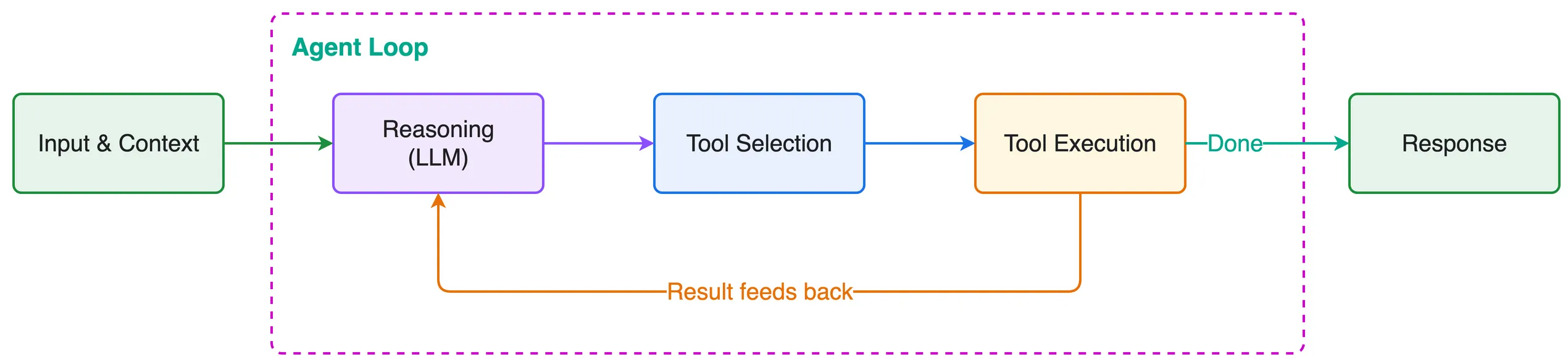
- Model receives context (system prompt + user input + tool list + history)
- Model reasons and decides whether to call a tool
- Tool executes, result feeds back into context
- Loop repeats until the task is complete
Agent = Model + Harness
Section titled “Agent = Model + Harness”The harness is the system that surrounds the model and turns it into an agent. It handles the agent loop, tool execution, context management, memory, lifecycle control, observability, and verification.
Together, model + harness = agent.
Three Layers of Engineering
Section titled “Three Layers of Engineering”Prompt Engineering: Instructions and constraints sent to the model
Context Engineering: What information enters the context window, when, and how
Harness Engineering: The runtime system orchestrating everything
Strands Harness SDK
Section titled “Strands Harness SDK”The Strands Harness SDK is an open-source SDK for building agent harnesses. It provides composable primitives like tools, context management, lifecycle hooks, memory, sessions, evals, and observability that you assemble into whatever system your use case requires.
Design philosophy: Let the model drive. You define the environment and boundaries; the model reasons through the task.
Code: A Simple Agent
Section titled “Code: A Simple Agent”This is already a working agent with a loop, just without tools.
from strands import Agent
agent = Agent()
response = agent("What are the key differences between REST and GraphQL APIs?")print(response)Code: Agent with Tools
Section titled “Code: Agent with Tools”The web_fetch vended tool pulls in an HTML parser, so install the SDK with that extra: pip install 'strands-agents[web-fetch]'.
from strands import Agent, toolfrom strands.vended_tools import file_editor, web_fetch
@tooldef query_product_database(query: str) -> str:    """Query the internal product database for inventory and pricing information.
    Args:        query: Search query for products (e.g., "wireless headphones", "USB-C hub")    """    products = {        "wireless headphones": "SKU-WH100: Wireless Headphones Pro - $79.99, 142 in stock, 4.5★ rating, launched 2025-03",        "usb-c hub": "SKU-UC200: USB-C Hub 7-in-1 - $45.00, 89 in stock, 4.2★ rating, launched 2024-11",        "mechanical keyboard": "SKU-MK300: Mechanical Keyboard RGB - $149.99, 23 in stock, 4.8★ rating, launched 2025-01",        "noise cancelling": "SKU-NC400: Noise Cancelling Earbuds - $129.99, 67 in stock, 4.6★ rating, launched 2025-05",    }    key = query.lower()    matches = [info for product_key, info in products.items() if product_key in key]    if matches:        return "\n".join(matches)    return f"No products found matching '{query}'. Available: wireless headphones, usb-c hub, mechanical keyboard, noise cancelling"
SYSTEM_PROMPT = """You are a product research analyst. You help the team understandmarket positioning by comparing competitor pricing with our internal catalog.
When given a research task:1. Use web_fetch to gather public market data from the web2. Use query_product_database to check our internal pricing and inventory3. Write a brief competitive analysis and save it to report.md using file_editor"""
agent = Agent(    tools=[web_fetch, file_editor, query_product_database],    system_prompt=SYSTEM_PROMPT,)
result = agent("Research what wireless headphones are trending on the market and compare it against our offerings. "               "Write a short competitive positioning summary and save it to report.md")
Key concepts:
@tooldecorator turns any Python function into an agent-callable tool- Docstrings become the tool description the model sees
- Type hints auto-generate the input schema
- System prompt defines agent identity and behavior
After a run, agent.messages shows every step the loop took: user turns, assistant text, tool calls, and tool results. This is the first place to look when you want to know why the agent did what it did.
Out of the Box Components
Section titled “Out of the Box Components”Strands also ships preconfigured components that give you a capable agent out of the box:
- Vended tools for file operations, shell access, and web fetching
- Automatic context management that offloads large results, compresses old messages, and fires proactive compression before the window fills
- Plugin system for extending behavior
You can start with these defaults and customize from there, or build from scratch using the primitives.
from strands import Agentfrom strands.models import BedrockModelfrom strands.vended_tools import file_editor, shellfrom strands.vended_tools.web_fetch import web_fetch
agent = Agent(    model=BedrockModel(        model_id="us.anthropic.claude-sonnet-5",    ),    # Vended tools for file ops, shell, and web fetching    tools=[file_editor, shell, web_fetch],    # Auto context management: offloads large tool results, compresses old    # messages into summaries, and fires proactive compression at 85% usage.    context_manager="auto",)
# Give it a research taskagent("Research the current state of AI agent deployment patterns in production, including common architectures, challenges teams face, and best practices. Write a summary to report.md")